Table of Contents
Introduction
KeePass has long been the gold standard and darling of the tech world, earned through its unrelenting commitment to security, stability, and data sovereignty. However, the XML format which the KDBX file format has been predicated on since 2007 has become a persistent friction point for developers and users in the adoption of modern security and convenience features.
The Problems with KDBX
Let us first start by explaining what a KDBX (4.1) file actually is. 1 Barring the technicalities, a KDBX file is an encrypted & authenticated gzipped XML file which contains the typical fields you may expect of a password manager. Attachments are stored as binary data (the old KDBX 3 format used to base64 encode the files), while custom icons are stored as base64 strings within the XML file. Important to note is that every time a KDBX file is updated, no matter how small the edit was, the entire file gets rewritten. The entire file is also loaded into memory. Perhaps the most relevant part of the spec to this post are the TProtectedString and CustomData references, which, respectively, are the user-facing custom attributes, and non-user-facing plugin or app data.
Brittle Schema
The primary issue is that new features cannot be added natively to the XML tree without causing breaking changes for older clients or third-party clients which have not adopted the change yet. This has led to significant problems implementing new standards that were solved ad hoc, in a backward compatible manner using the custom attributes.
Prior to any KeePass client supporting TOTP, third-party KeePass Proper plugins implemented the feature by adding a TOTP entry to the custom attributes. The problem was that different plugins used different field names and stored the generation parameters differently, making them mutually incompatible. Certain mobile clients then began to include support for the most common plugins’ TOTP format. Then, KeePassXC implemented it into the main client, opting for a standard otp URI that was interoperable with most standalone authenticator apps. Like the plugins, this otp field was stored in the attributes. When KeePass Proper came around to implementing TOTP support natively, Dominik Reichl, the founder, disliked the URI format due to parsing and UX issues.2 This caused another discontinuity, where KeePass Proper used TimeOtp-Secret while the community forks and plugins mostly used the previously described otpauth format.3
Passkey support is another example where complex data was shoehorned into the custom attributes rather than being treated as a first class citizen. StrongBox was the first client to implement passkey support4 and actively collaborated with KeePassXC to ensure compatibility for KeePassXC’s future release. However, there was a brief period of incompatibility between the two programs, which was promptly resolved.5 Passkeys litter the user-facing attributes with five different entries, which makes it difficult to select entries which actually matter to the user.
Further adding to the clutter, some mobile clients add attributes which associate app IDs to entries for autofill. Here is a particularly egregious entry I have which best demonstrates this issue:
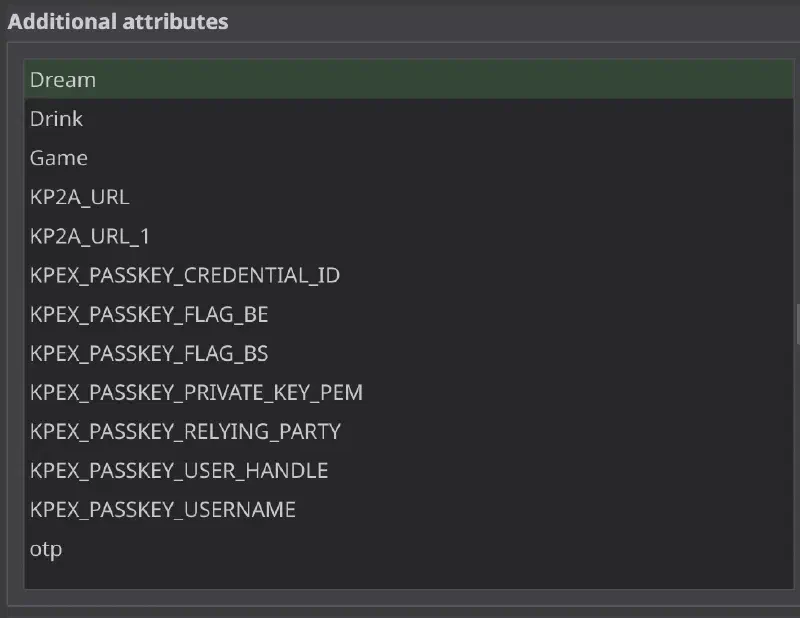
The first three security question attributes are the only ones that are mine!
The lead developer of KeePassXC summarizes the whole issue well:
I am trying to avoid implementing a multitude of “minor” interim solutions. That creates significant code bloat with exceptions and workarounds depending on which version of the standard you are on. The myriad of plugins made for KeePass over the years demonstrates why this is not a good thing. They all made their own unique standards.
Modern security features should never need to get in the user’s way, and should never have the potential for a user to be locked out of reading it simply because their mobile client understands otp while their desktop client understands TimeOtp-Secret. In practice, the different clients just support both, but this is an undue technical burden which could be solved with explicit and special support in the schema to begin with.
Storage Inefficiencies
As mentioned, KDBX files keep all custom icons as base64 in the XML file. This causes a roughly 33% jump in file size per icon. It also massively increases memory usage and decreases access and save speed, especially on mobile, since everything needs to be loaded into memory. Further, since the whole file is rewritten on every edit, there can be problems if the program crashes or power halts mid save. Also, the chance of irrecoverable corruption on network shares or cloud services is high, which is why several KeePass clients offer alternate saving methods which involve backup files.
Although I quite agree with Dominik on general encrypted file storage being far out of scope for a password manager, I have noticed that many KeePass users report using the database as an all-purpose secrets manager. Users attach unoptimized passport, ID, and all sorts of important scans to their password database all the time. Paired with custom icons for every entry, the most dire cases involve horrific databases which have bloomed to 500+MiB. I recognize that this is a severe outlier, but many users have databases that fall in the range of 10-100MiB (Just a few PDF attachments can get you in this range), which is well in the realm of super slow mobile unlocking, and getting OOM errors during autofill events.
Just to emphasize that I have no horse in this specific race; my personal database sits at around 50KiB. However, I still believe that users should be able to conveniently store a set of various secrets in their password database rather than have to use a variety of encryption tools which are often not as user or mobile friendly as the KeePass ecosystems.
Governance Issues
Dominik Reichl has maintained this format and its iterations for longer than I have been alive. So everything I say should be taken with a grain of salt and with utter respect to his efforts. I sincerely appreciate the immense focus on conservatism and compatibility in many of his quite wise considerations.
However, this attitude is fundamentally at odds with being able to expand the features of the format to better accommodate modern use cases and development practices. To quote a KeePassXC maintainer in response to Dominik bumping the minor version with small changes from the wider discussion:6
I’d be happy if we could somehow sketch out what a KDBX 4.1 and/or 5 should look like together. I don’t want to add too much bureaucracy to the process, but Dominik just picking or rejecting things and informing us about it, seems kinda one-way (no offence in any way, I appreciate the communication)
The somewhat interconnected shadow schema that has developed across the various forks is just not sustainable. It has led to a various matrix of incompatibilities that could have otherwise been avoided if the entire format had been developed together. KeePassXC by far has the most users and is under the most active development. If we were to combine the four popular mobile clients in this count, they far outweigh the userbase of the original KeePass. This is to say that it is unfair and impractical for the vast majority of users within the KeePass ecosystem to be unilaterally subject to the original program’s decisions regarding the file format. It also leads to a first mover advantage, where whichever major client implements some sort of feature that their users request, that features namespace then has to be accounted for in the other clients.
In cloud native platforms like BitWarden, these issues are non-existent, as the company can arbitrarily change their schema completely transparently to its users. With a local first ecosystem like KeePass, you cannot just update every user’s file at once. A modern, open democratic spec is a necessary step for continued practical development.
Why SQLite with SQLCipher is the Right Answer
A final breaking refactor to SQLite has the potential to solve all three major problems. Let’s go in order.
Devising a new schema based on SQLite would allow for current features that are being jerry-rigged into the attributes to have their own real place in the database, rather than clogging the user-facing fields. It also ensures that if in the future, some weird authentication method were to come out, no breaking changes would be needed. You simply would add a table to accommodate it, and old clients would simply not support the feature and just load the database without it. Of course, a warning would be shown to the user if somehow their database uses new features on an old client. Devising it together would allow for all the weird program specific fields to be scrapped in favor of a unified location for things like app associations and autofill histories. This would be the codification of the years of “interim features” and fixes piled on by the forks.
An SQLite based store is one of the most tested and optimal formats for document and application storage. The creator of SQLite writes extensively on the matter,7 so I will not cover all the benefits, just the specific ones that address the problems I brought up. Database sizes could get dramatically smaller due to icons being stored as blobs. Memory usage would significantly drop for larger databases, as SQLite does not need to load the entire file into memory during opens or saves. This allows for better use of the KDBX file as a personal catch-all secrets manager for those who use it as such.
Many file sharing tools, sync tools, and some cloud platforms (Dropbox for instance) support delta syncs with block-level delta compression. For example, if you were to change a word in a text file, you need not reupload the entire file, just the small part that changed. This is not possible with a flat encrypted blob like a KDBX file. However, with SQLCipher, since all pages are encrypted, changing one password only changes its page. So rather than risking sync issues uploading your 20MiB KDBX file on every minor change, you can upload just the 4KiB or so comprising that data. This holds true even with SQLCipher’s encrypted pages. Additional benefits include:
- There exist far more tools to recover an SQLite database than there are to recover a KDBX database.
- Easier merges via
sqlite3_changesetand row level merges rather than entire file conflicts. - Easier developer experience through implementing complex searches via SQL queries rather than re-implementing entry search across every client.
Just like the crab is the ultimate form of crustacean life,8 a relational backend is the natural optimum for complex password management, and SQLite even more so for local management. The developers of the SQLCipher themselves created CodeBook, which is a password manager based on SQLCipher, showing their immense trust in it as a storage format. Enpass is another such example. It just works.
A switch this big is a major chance to fix the governance structure and align it more with a democratic consortium than a benevolent-dictator-for-life style of project management. This would also probably warrant a new file extension to signal how incompatible this change is, perhaps
.kp?So many quality of life features can be added where the old schema disallowed it. Things like a granular global history and versioning, more complex group relations, etc. Long requested features such as specific entry types for payment cards, or anything else that does not neatly fit into the username and password paradigm. Keeping my credit card number in the password field with several attributes is just not satisfying. Other password managers (BitWarden, CodeBook) have no problem implementing features like this. In fact, CodeBook supports completely arbitrary templates and does not place on restrictions on how the user organizes their data. Some KeePass client developers have even hinted at the fact that SQLite would be able to do a lot of what they want!
Anticipated Rebuttals and their Refutations
The transaction safety and rollback features of SQLite are against the one-file philosophy of KeePass. To which I respond: The auxiliary files (WAL, SHM, etc) are not necessary to retain the robust transactions and safety of the file. You can easily
VACUUM INTOon every save or setPRAGMA journal_mode = DELETE;or use one of the many other ways to operate the database as a single file and be on your way. You can also just use a rollback journal, which does create a temporary file which is deleted right after the transaction (pretty similar to the existing save features in clients, but does not duplicate the entire database). Also, many KeePass clients inherently keep around one or more backup files to avoid corruption issues while saving.Backwards compatibility. Look, there are people still using KDB files. There are people still using Excel workbooks. God forbid, there are people using Post-It notes. The reality is, the majority of users want modern features. An SQLite based format facilitates this better than the kdbx format, and only requires a one time hurdle for long-term format stability after. This is not dissimilar to the jump from KDB to KDBX (which yielded far less benefit for a breaking change). The migration process would also be frictionless for users, it is a simple data map between two heavily structured format.
Preservation and Human Readability. Ultimately, both formats in their end state are generally encrypted blobs. This state is not human readable at all. The formats must be opened in plain text, which is severely discouraged except in the case of a quick export. I have nothing against keeping an XML export format, as it is probably easier for other random password managers to parse and is more readable in a text file than an SQLite dump. SQLite is also recognized for its long term preservation value by the Library of Congress.
Users have the freedom to open the DB in insecure views that don’t protect the memory space like DB Browser for SQLite. I don’t consider this a huge issue, as users can also export their plaintext KDBX file to CSV or XML and view it just fine. Users also routinely do dumb things like using a poor master password or lack backups. What the user does with their file is ultimately up to them.
Adding a SQL engine is too heavy of a dependency. I heavily disagree, there are so many apps that do far less than any KeePass client which use sqlite. The contacts app on your phone that does absolutely nothing but shows, adds, and deletes contacts (analogous to a primitive password store) bundles SQLite. It is also one of the most audited and mission critical pieces of software on the planet, with 100% branch test coverage. Used in the field (well, mostly in the sky) by NASA, AirBus, and everyone else you could imagine.
Metadata leakage. There should not be a substantial difference between the flat KDBX file and an encrypted SQLCipher database in terms of forensic analysis. SQLCipher uses fixed page sizes, so file size growth is less linear than a KDBX file. If it is good enough for Signal and the previous password managers I mentioned, it is probably good enough for KeePass. Also, I would like to mention that Pass; the Unix password manager and its derivatives overtly leak data about how many entries you have and to which service they belong (No shade though, I understand the arguments). A SQLCipher implementation would never come close to that level of information leakage, and yet Pass is considered completely fine.
Call to Action
KeePassXC is already the de facto leader of the space, I urge the developers to focus their efforts on declaring the spec and including the major mobile developers in the discussion from start to finish. There seems to have been an attempt 9 to develop a new spec on the KeePassXC GitHub organization that has not seen an update in 8 years!
As for users, if the arguments persuaded you, voice your support in the relevant public development forums and channels.
My cursory (lol, get it?) understanding may be incorrect. Please feel free to call out any technical assumptions or errors I may have made!
Also, before anyone beats me to it:10
This seems like an implementation issue rather than a format/spec issue.
VaultWarden is a good compromise (offers the choice of SQLite or Postgres under the hood), putting you in charge of the primary server, but it is honestly overkill for a single personal user compared to a kdbx file on a webdav share.
Maybe. I'm looking into VaultWarden for my personal passwords because keeping a KBDX file up to date on iOS is painful (without a corporate cloud backing).
Good tip, I'm going to check that out!
Also, I don't understand how using XML makes for a brittle schema and how SQL would solve it. If clients choke on unexpected XML elements, they could also do a "SELECT *" in SQL and choke on unexpected columns. And the problem with people adding different attributes seems like just the thing XML namespaces was designed for.
Though there would be opportunity to use more of the ZIP "folder structure" especially for binary attachments and icons, it wouldn't necessarily be "required", especially not for a first pass.
(That said there are security benefits to whole file encryption over piecewise encryption and it should probably be an option whether or not you want in-place saves with piecewise encryption or whole file replacement with whole file encryption.)
A ZIP file with incremental encryption (i.e., each file is individually encrypted as a separate item) has its own problems. Notably: the file names are exposed (though this can be mitigated), the file metadata is not authenticated, and the central directory is not authenticated. So sure, you can read that index, but you can't trust it, so what good is it doing? Also, to support incremental updates, you'd either have to keep all the old versions of a file around, or else remove them and end up rewriting most/all of the archive anyway. It's frankly just not a very good format.
Smaller ideas that would address this: add support for non-CBC encryption modes, tweak/disable the compression so that small changes require less rewriting.
If it's even tracked as an implementation issue, it probably ranks very low and fixing this requires a lot of care not to screw up things with the safety and feature rollout.
I mean if I wanted to start new password manager right now it would be a good choice to "just use SQLite" but for existing solution backward compatibility is far more important
I don't get it. Is this a reference to database cursors? Or is it implying that the blog post was AI generated?
Perfectly possible with XML too
> An SQLite based store is one of the most tested and optimal formats for document and application storage
It's optimized for things that largely don't matter for password storage. The testing is admirable, but there's no issue of keepass clients crashing or corrupting data so again, not very relevant (probably because of low concurrency, simple writes etc).
> A switch this big is a major chance to fix the governance structure and align it more with a democratic consortium than a benevolent-dictator-for-life style of project management
You don't need a technical change to solve this. In fact, a fork that would fracture clients is the last thing you need when making governance changes.
> So many quality of life features can be added where the old schema disallowed it
All of the features they list can be achieved with an XML format. The format isn't what's holding them back.
Not writing the entire database on every save?
Whereas, any incrementally encrypted format has the additional risk of piecewise manipulations. For example, while SQLCipher authenticates each page, it doesn't authenticate the entire file, allowing for pages to be deleted, reordered, or duplicated (though duplication is easy to detect since each page has its own IV). The end result will generally just be a corrupted database, which will probably get detected by PRAGMA integrity_check, but compared to KDBX, this will not be detected by default nor is it guaranteed to be detectable at all.
A part of me wonders if the only real upgrade needed for the next "large file" KDBX relative format is from a GZIP stream of the XML plus attachments to a ZIP container of the XML with attachments in some folder structure combined with the choice of a good piecewise (modern) encryption for the ZIP container. (That is taking more cues from 7zip than from classic, now broken password-encrypted ZIP files.)
(Though as someone who tries to keep my KDBX files small, I think I'd still prefer the option of a whole-file encrypted format.)
All of which is to say I would bet on something in the webdav-nextcloud line being at fault instead of keepassxc.
If anything, maybe give people the option to export to SQLite and then use that going forward but keep it entirely optional.
As for scale this app is for one person doing one query at a time or saving one password at a time. One person will not be saving millions of passwords or if for some reason they are then they can export to a format that an enterprise solution could take it's place. People have written team / company password managers that can use Oracle, MySQL and Postgres that can track and audit user and team password changes. This is not something that should ever be expected of an individual personal password manager like KeepassXC.
This is just my take but I would rather have the maintainers of KP focus on bugs, usability issues, quality of life enhancements which they have been doing great thus far in my opinion. Forcing a schema migration is just asking for trouble and potentially causing bugs that turn some people away from using it or cause people to lose data if they do not have snapshots of their database. Or if forcing a schema change make for damn sure there are many backups in each format and encourage the users to back up all the files to many external encrypted drives and store some of the encrypted devices off-site. Something everyone should be doing regardless.
Most probable reason would be that I ended up editing on the wrong machine while being offline or having it open on another one, so user error. But I don't know.
In any case, the only 2 moving parts were KeePassXC (I think, not sure when I moved on from KeePass) and syncthing. But most importantly, it was easily fixed every time, no broken file - which points me more into a syncthing diverge.
Otherwise, no, apparently no issues with kdx itself, or I wouldn't have been able to merge these problems. (which brings me to my pet peeve, a good working merge is missing...)
File locks or attempting to overwrite and open database would be a problem regardless of schema format or what application is holding the database file open for writing. This should be expected behavior and one would hope the app would detect this and seqfault / core dump without corrupting the original / previous version of the database file.
That problem that the current schema doesn't have enough ways to declare custom memory-protected fields outside of user-facing attributes seems just as likely to be replicated and maybe worsened in an SQL schema.
Changing the database engine doesn't fix the architecture problems nor schema migration problems. It's certainly a good time to reevaluate the architecture problems and the schema migration problems. But the huge caution I'd suggest here would be look at the ossification complaints about the current XML schema and expect SQL migrations to be worse and plan for worse multi-schema operations and intenser ossification. (Especially because these files are expected to live in a large multi-vendor ecosystem, SQLite schema migration management is going to be much worse than any XML schema management.)
None at all. That is why I am saying it should be entirely optional so most people can just ignore it and those wanting the alternate schema can get their feature request fulfilled.
I do not see how it would benefits end users in any significant way. Sure, you can look inside the database, how many people need that?
Dumping the database to CSV is not a good backup, schema changes over time, what was dumped from one version of the app would not work for importing into another version if schema changes. Backup it needs a versioned schema format, which would actually look like KDBX format if implemented in XML :-)
I built KeePass Tusk back in 2018, for example. This would kill the project and abandon 30K users without a rewrite of the JS engine (there are several now!)
I agree with you that KDBX sucks, but at this point a keepass based on SQLite would be keepass in name only, a new password manager to migrate to.
That said, most of the concerns raised by the article — outdated schema, inefficiencies, governance issues — call for a new iteration of database format, but not necessarily SQLite. However, we would still be debating how to represent entry templates and how to accommodate features that stretch format's initial assumptions (be it multi-URLs or smart groups). We may still discover that passkeys need more fields than initially foreseen. Then someone would come up with item-level access rights scheme. Then something else.
All of these are already possible with XML+Gzip, just as much as with SQLite/SQLCipher. The main advantage of the latter is the standard, multi-platform library with a permissive license, instead of KDBX' specialized parsing. Switching to SQLite would probably lower the entry barrier for new apps. Which would be a good thing on the surface (more choice), but could end up with the same devil-in-details bedlam as the status quo.
Unfortunately, KeePassium's data layer was designed in the times of iOS 11, before AutoFill became a thing. So I chose the easier path of loading and processing the whole file at once. This made sense for 10-20 MB databases on iPhones with 2 GB of RAM. By the time the mistake became obvious, it was much harder to switch to streamed processing, especially with a long queue of lower-hanging feature requests.
The lower barrier to entry probably also reduces the number of catastrophic parsing mistakes a developer can make. This is a net positive gain for the wider ecosystem of external tools which do not have to re-implement the whole parser. Every language has a great SQLite library, the same cannot be said of KDBX.
> The migration process would also be frictionless for users, it is a simple data map between probably the two easiest formats of all time.
I cannot imagine how you could mess this up. The developers already implement numerous export formats. The migration is the easiest part. The actual implementation of a new data format into the codebase and all the new security and robustness testing is the difficult part.
Why is your KDBX file 20 MiB? It seems you are storing something that is not actually a good fit for a password manager, and expecting the entire world to change around you instead of storing those files in a more appropriate place.
My kdbx is only 173 KB, but I don't hate this idea.
I maybe half agree with you about the encrypted overlay filesystem but only in respect to files, not passwords though. I tend not to keep files in KP, if I need a singular encrypted file I'd probably 7zip it (7z format) with a password and encrypt the filenames. The password goes in KP as does the location.
The URL field in KeePass has lots of convenient features [0], but unfortunately they're quite "obscure" and not very discoverable.
[0]: https://keepass.info/help/base/autourl.html
The safe combination is a secret, and obviously belongs in secret storage.
In this specific example, if I had trouble remembering whether the first number of the combination was reached via cw or ccw rotations, I'd include that in the secret, e.g. "cw34-12-22-45".
(Some safe combinations require multiple rotations. I unintentionally became the owner of one that is something like "cw3x34-ccw2x12-cw5x22-ccw2x45". I still can't open it actually, but that pattern is what the Internet tells me. :)
Sure, but I will need it at the same time and for the same reason as the combination which does belong in the password manager. To store it separately would be more difficult.
In any event, it's not large. I seem to remember it is only in the low hundreds of kilobytes. But there is occasion for such things.
>I unintentionally became the owner of one that is something like "cw3x34-ccw2x12-cw5x22-ccw2x45"
Mine is similar. I even have the cw/ccw in with the numbers, but that alone never seems to get it for me... sometimes I do need to look at the pdf. I simply don't get enough practice to do it from memory.
EDIT: also you don't need to have just one password vault and I'd say you probably shouldn't, separate entries also assist with separation of concerns. This last adds a little overhead but is a reasonable workaround.
However on the whole I like sqlite for app persistence. It can, however, leak data (forensically) if not managed properly.
For 10 years I've managed a family of 4 in a single KeePass db. Unique passwords across all accounts, random passwords instead of PII for "security questions", fake DOBs, and all other random security related stuff. Never had a single issue. Everything happens instantly as far as I can tell. And the file is 67kb.
My work dbs, separate only because they should be, are much smaller and simpler.
I love KeePass. Changing everything under the hood probably only has potential to make pain for the user. Best case is that nothing is made noticeably worse. Doesn't seem worth the risk.
Users have wanted proper custom entry templates for years in order to input their card details into the manager. BitWarden, CodeBook, and others all have this built in without needing to fiddle with attributes and autofill to make it work.
I think a major change like this is worth it when we consider the KeePass of the next decade or two. This is genuinely my most important file by a longshot. Basing it on SQLite is just the right move for future proofing.
A key aspect of SQLite's development model is its proprietary test suite. As far as I can tell, the SQLCipher developers do not have access to those tests.
This is not to say they aren't doing the best with what they've got, but SQLCipher is a fork of SQLite, and the scope of the changes they must make, no matter how conservatively they try to make them, should lead to a full re-test of the entire product, which they cannot do.
EDIT: I don't want this to come off as spreading FUD. The SQLCipher developers do a good job of laying out their development methodology, the relative (un-)testability of their product vs. SQLite, and other tradeoffs pretty well in the repository's README: https://github.com/sqlcipher/sqlcipher?tab=readme-ov-file#sq...
It is weird when people wants to change something that works just great.
KeePass have served me well for years on Windows, Mac, Android, Linux using Dropbox and Syncthing as storage. Don't mess with it.
SQLite doesn't fix this, because you would still need to encrypt the whole file (at least with standard sqlite). If you just encrypted the data in the cells of the table, then you would expose metadata in plaintext.
SQLCipher does provide that, but as mentioned by others, it isn't quite the same thing as sqlite, and is maintained by a different entity.
> The primary issue is that new features cannot be added natively to the XML tree without causing breaking changes for older clients or third-party clients which have not adopted the change yet.
That isn't a limitation of xml, and could also be an issue with sqlite. The real problem here is if clients fail if they encounter tags or attributes they don't recognize. The fix here is for clients to just ignore data it doesn't know about, whether that is xml or sqlite.
The complaints about compatibility between different implementations would be just as bad with sqlite. You would still have some implementations storing data in custom attributes, and others using builtin fields. In fact it could be even worse if separate implementations have diverging schemas for the tables.
> Governance Issues
None of this has anything to do with sqlite vs xml. It is a social issue that could be solved without switching the underlying format, or remain an issue even if it was changed.
https://www.sqlite.org/see/doc/trunk/www/readme.wiki
A weakness though, again, is that this is closed source...
Naiively perhaps I thought that was helpful with solid state storage because it means that old data is trimmed faster?
It mentions it near the entire file being in memory but that seems a dubious concern. If the key is in memory the entire file can be comprised either way. Nothing can really stop that if you have access to the programs memory.
That isn't really how keepass is meant to be used, but apparently people do use it this way.
I am not advocating for KeePass switching to a journal, however, because the current ecosystem is fine.
I’m at 1.6Mb, and with the frequency by which I update entries, the cost of data migration is relatively high compared to the data cost.
Eh? I always thought of pass[1] in that role.
> Devising a new schema based on SQLite would allow for current features that are being jerry-rigged into the attributes to have their own real place in the database, rather than clogging the user-facing fields. It also ensures that if in the future, some weird authentication method were to come out, no breaking changes would be needed. You simply would add a table to accommodate it, and old clients would simply not support the feature and just load the database without it. Of course, a warning would be shown to the user if somehow their database uses new features on an old client.
Using a relational database does not solve this problem at all. It doesn’t even address it at all.
The original problem is you have multiple implementations defining their own data model. Whether the backend is a file, a database, or a post-it note, that doesn’t work.
Just as you can ignore tables in a database, you can ignore attributes in XML.
[1]: https://www.passwordstore.org/
> use one of the many other ways to operate the database as a single file and be on your way
Don't you still have to download and upload that 100MB pretty often? I feel like password databases get modified every few days, not every few months.
Moreover, if an app really wants to optimize the file-not-modified case for people who don't modify it often, can't it just internally cache an encrypted version of the database in another format -- in SQLite, even! -- and use that when the checksum/file time/whatever matches what they expect?
I feel like a client that actually cares about the user should tell them how much more expensive the file gets with each entry being added: "Hey, based on your recent download/upload speeds on this device, embedding this 1MiB file would add a 5-second delay." Switching the entire world from XML to SQLite seems like it completely misses the fundamental issue.
I store every single important piece of info in my KeePass database. It stores ALL of my passwords, my SSN, credit cards, my health information, even some weird stuff like my vehicle maintainence records and whatnot. My KDBX file currently sits at 466K. Size is not a particularly compelling reason. Hate to be that guy, but if your database is much larger than that - you're probably doing it wrong.
Newer features like TOTP and passkeys are likewise not a concern for me. What did KeePassXC do when TOTP came around? They stored the relevant data in the attributes, and added a UI around it. It even works with my Steam TOTP, which is a nonstandard implementation. I haven't looked into it, but I imagine they did the same thing with passkeys. I don't see why this couldn't continue to be the paradigm they use. I don't use attributes at all - I haven't needed to, the notes section work great - but I do appreciate being able to look into the "raw data" of attributes quite easily, from within the UI.
If KeePass were being developed from scratch today, or if the developers of the various projects collectively really, really want to switch to a SQLite system of their own volition. Then sure, SQLite. I'm not going to ask them to do that now though.
---
On a separate note, an unfufilled niche that I have though, if anyone's looking for ideas. My secure password storage is a solved problem, KeePass is cross platform, easy to use, and very secure. What remains a problem is secure notes. I want to be able to write markdown (`.md`) documents, add photos and PDFs, then save it to a secure, encrypted folder somewhere. Doesn't need the same security posture as KeePass, but I don't want to leak metadata like file names.
Obsidian - my current notes app - is good from a usability standpoint, but it's not exactly secure. I could pair it up with Veracrypt, but that's a pain from a usability standpoint, and I don't trust my OS to keep the mounted Veracrypt volume contents a secret. Whatever the solution is, it must have a GPL license, or else I'm not going to trust it - from a long-term viability standpoint more than anything else.
If anyone has any suggestions here, would love to hear them.
I thought I had a lot of info in my *.kdbx file - not just passwords - mine is a mere 80kb, though i do keep medical in a 'note to self' on signal.
Cryptomator checks all the requirements. It is a cross platform, GPL'd, encrypted overlay filesystem which you can put anything in, not just markdown docs. Just unlock it and point your notes app to it. Lock when done.
https://github.com/cryptomator/cryptomator
You can pay me to build you SAP in Excel, but you really shouldn't!
If you have a 100mb password database, should you be moving to a more scalable solution?
I argue more for the use case of "secrets manager" than solely password manager. People store TOTP seeds and Passkeys and a myriad attachments. A SQLite store would better facilitate this, as not everything has to be in memory all the time. This is only with regard to the size constraint, there are so many other benefits to be had from a formal specification of the schema to truly future-proof the standard.
What issues does storing an encrypted value (password, metadata, etc) associated with a particular key (let's say website name) have? (apart from leaking the fact that that file has a entry associated with that site)
That is a big fat leak right there
It uses SQLCypher as local data store and keeps KeePass-compatible data model - supports import of .kdbx database.
SQLCypher and different schema used in Lockstep alone did not solve any problems that I have with Keepass. Those problems are sync and sharing.
Solving sync and sharing cannot be done on whole database file level, as it implemented now in KeePass. Changes need to be tracked at the password record level, all changes need to persisted as operations log and that log needs to be distributed across devices.
The above means writing a whole protocol, and that's a lot more work than changing local storage.
The project is pre-alfa https://github.com/lockstepvault-hq/lockstep
Ok, but "some" isn't even "many", and the core reason why the single-file problem doesn't go away with sqlite
Instead the new solution must be dumb-cloud-friendly any rely on multiple files, and definitely split all the pdfs and icons away from the few kilobytes of actual user passwords
True, but it’s a start.
Splitting the file into pieces is certainly not the right way to go about it though, as you would just be poorly emulating VeraCrypt! The most robust sync solution is an actual protocol (like Bitwarden), otherwise dumb file syncing is going to have the same issues it usually has.
As for the protocol my main argument is that passing around a file with dumb syncing is always going to have issues. The only real way to mediate it is to have a defined schema and standardized sync protocol between keepass clients. This would make them behave more like a centralized password manager. However, this approach would require some sort of relay infrastructure and just ends up emulating syncthing but for application specific data rather than simple files. It’s far out of scope for KeePass IMO to build a p2p sync protocol.
Editing this comment because a user in this thread actually acknowledges this point:
> Solving sync and sharing cannot be done on whole database file level, as it implemented now in KeePass. Changes need to be tracked at the password record level, all changes need to persisted as operations log and that log needs to be distributed across devices.
Which is what keepass is, it just fails in a few ways (built to contain passwords and attachments) some of which are what the format change suggestion is supposed to fix. So I don't understand the conceptual disconnect.
> passing around a file with dumb syncing is always going to have issues
That's true of everything, including the protocol. But also, how does it help if you think the protocol is out of scope anyway, so shouldn't block non-ideal improvements? Let's not perfect be the enemy of the good?